The Academic Career Path and Traps Nobody Warned You About

Your dream is simple keep learning, contribute something real to the world, stay financially secure. Academia seems like the perfect answer. Research, teaching, intellectual freedom and sometimes respect and stable income. So the journey begins.

To enter research, you need two things: skills and luck. The skills you can build. The luck is harder it means surrounding yourself with the right people at the right time. People who help you navigate what no syllabus ever explains: which problems matter, which advisors are generous, which opportunities are worth chasing.

You cycle through internships, programs, applications. If things go well, you land in a PhD program ideally one where someone actually pays you to think. That last part matters more than people admit. A funded PhD on a problem with long-lasting impact is a rare thing. Many researchers spend their doctoral years on applied projects whose value evaporates within a few years, as the technology underneath them is replaced.

But assume you are among the fortunate. You have two or three years of relative quiet. Deep work. Uninterrupted time to think. Collaborators you can learn from. An advisor wise enough to point you toward problems that will matter in a decade. In those years, everything feels possible. The dream is real, and you are living it.

Then the PhD ends. And a choice appears except it is not quite the free choice it looks like from the outside.

You can go to industry. But industry research, in most places, trades freedom for resources. The compute is better, the pay is better, but the research agenda is rarely entirely yours. Commercial priorities are often short-sighted are focused on fast returns.

Or you can stay in academia. Become a postdoc, then apply for faculty positions, then if you are lucky get tenure. But something shifts the moment you become a faculty member. The very thing that got you hired, your ability to do research, becomes the thing you have the least time to do. Grant writing consumes months. Committees consume afternoons. Students need guidance. Administration needs reports. The calendar fills with things that have nothing to do with why you came.

The cruel irony of tenure: you are hired because of your research output. The moment you achieve job security, the job restructures itself around everything except research. The skills most valued in you on arrival are exactly the skills the role then systematically prevents you from using.

And here is the part that stings most: for many researchers, this shift is not a choice they get to make. It does not arrive at a scheduled moment after the PhD, politely announced. For some, administrative weight begins accumulating in the later years of the doctorate itself as they start co-supervising students, organizing lab logistics, sitting in on faculty-facing meetings. The window of pure research time begins narrowing before most people realize it has a closing date.

So where does that leave someone who simply wants to keep doing the work? The answer is more concrete than it might seem find one of these environments, or build one.

Such places exist but rare, Bell Labs at its peak, certain early industry research labs, specific fellowship structures that give scientists money with no strings attached. They tend to appear, produce something extraordinary, and then dissolve under the pressure of institutional needs. Ironically these are places where the most significant research happens most of the time. Quiet, protected corners where the most significant research in history has repeatedly happened not in prestigious universities drowning in bureaucracy, but in places deliberately designed to leave smart people alone. The transistor, information theory, Unix all came from one building where researchers were simply not interrupted, same goes for Google Brain and possibly for other places like that.

The practical question is how to find it or how to create something like it yourself, even at a small scale.

If you still want to follow this dream, start by researching the system you are about to enter with the same rigor you would apply to any research problem. Map the terrain honestly. Understand where the protected windows and places exist, how long they tend to stay open, and what forces close them. The same clarity of thinking that makes a good scientist makes a good career decision.

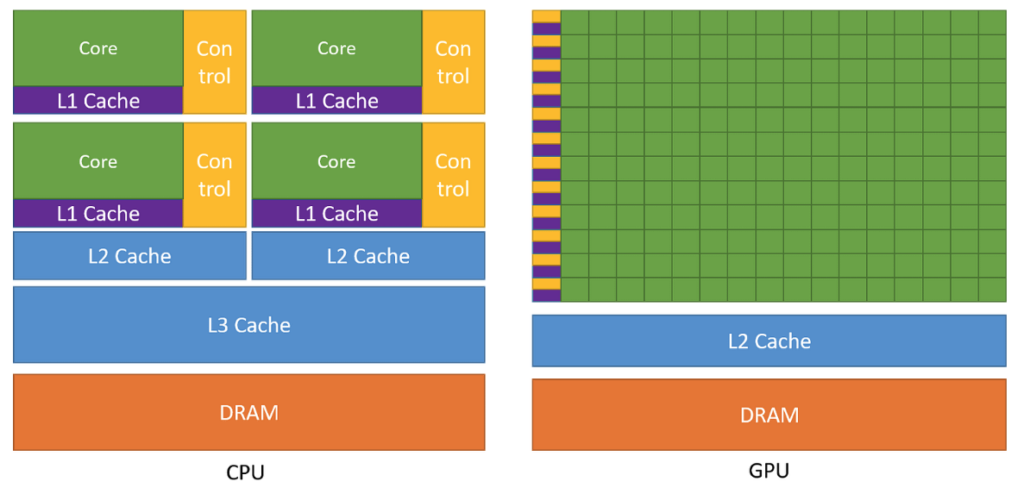
Understanding GPUs with simple Analogies – trucks and construction sites.

Good teaching relies on finding the right analogy. I don’t think of analogies as simplifications as if we are dumbing something down. I think of them as a symbolic language: a different way of encoding the same idea, one that happens to be far familiar for our brains to grasp.

Understanding how GPUs work is genuinely hard. There are billions of transistors, layers upon layers of design decisions, and a gap between what the hardware does and what a programmer sees that took decades of engineering to bridge. In my Efficient Models class, I employ two analogies that I believe help understanding inner workings of GPUs.

The first analogy comes from Tim Dettmers, and it is simply brilliant. He compares CPUs and GPUs to a racing car and a truck.

A CPU is the racing car. It is built for speed and responsiveness for tasks that are dynamic, unpredictable, and sequential. Think of a courier driver navigating a city: a new delivery arrives, the route changes, an order gets cancelled, traffic builds up on one street and clears on another. Every few minutes the driver has to make a fresh decision. That kind of rapid, adaptive thinking is exactly what a CPU excels at. It is fast, flexible, and able to react in real time.

A GPU is the truck. It is not built for that kind of fast decision-making. Put a truck in the middle of rush hour and ask it to recalculate its route every thirty seconds, and you have a problem. But give it one clear job load up, follow the route, deliver everything at once and nothing beats it.

Now, that delivery car does not operate alone. Accepting orders, declining them, talking to clients, handling cancellations all of that requires a support team. And because the work is so dynamic, that team needs to be large. The truck, following a fixed route with a predictable load, barely needs one at all. This maps directly onto how CPUs and GPUs are built: a large portion of a CPU chip is dedicated to control logic, the circuitry that handles decisions and adapts on the fly. A GPU trades most of that away in favour of raw compute units, because its work is regular enough not to need it.

But once you scale this picture up a whole fleet of trucks, racing cars, support teams, loading bays, warehouses near and far a new kind of problem emerges. It is no longer just about speed or load capacity. It is about management: how large should each support team be, where do you place the storage units so vehicles can reach them quickly, how much can each unit hold?

Here is where I find a second mental model useful one I had to develop to explain inner structure of GPUs in in layman’s terms.

Let’s think of a GPU not as a single vehicle, but as an entire construction project and your job is the site manager.

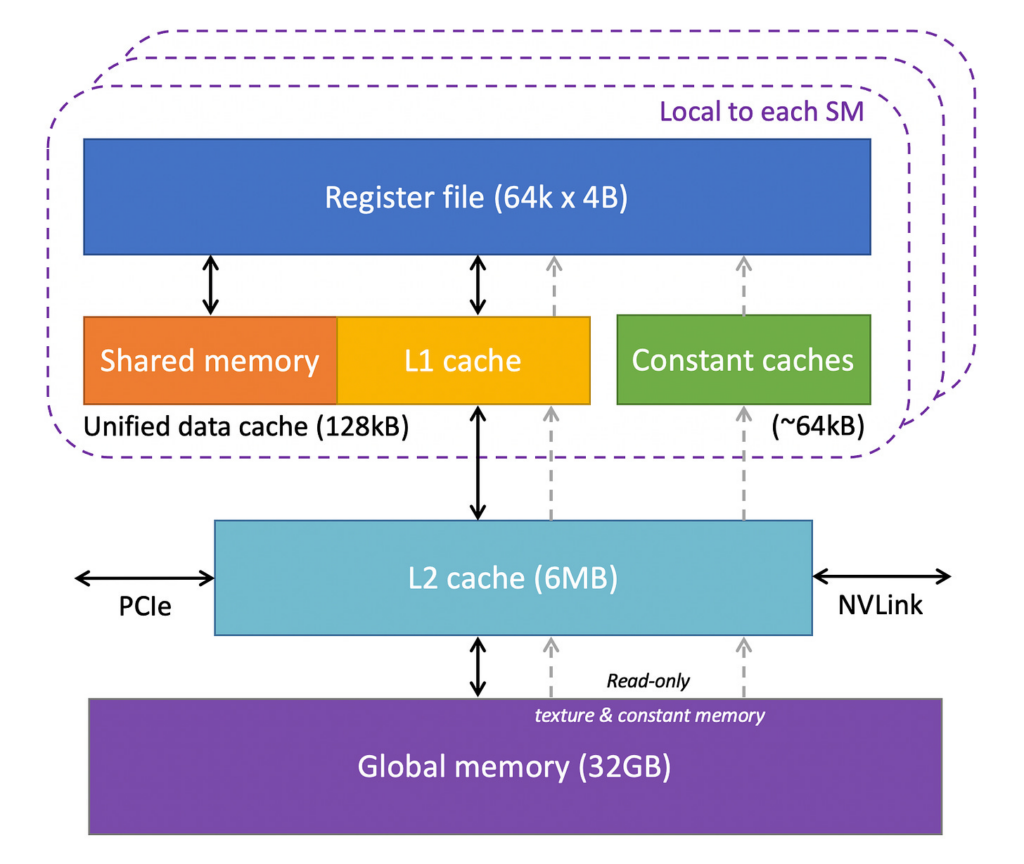
On a construction site, you have hundreds of workers (threads). They are grouped into teams (warps and blocks). Each team works on its own section of the building (a tile of the matrix). Materials are stored either in a large warehouse far away slow to access but vast (global memory, your 40–80 GB of GPU RAM) or in a small on-site storage shed that each team can reach in seconds (shared memory, just 64 KB per processor).

Now we create some structure and hierarchy to run the construction efficiently.

Construction siteGPU conceptNotes
The entire construction companyGPUManages thousands of workers across many sites
A building siteSM (Streaming Multiprocessor)One site with its own foreman, equipment, and crews
A housing complex projectBlockOne assignment given to one site e.g. “build 128 identical units”
A specialist crew of 32 workersWarpAll workers do the same task simultaneously
An individual workerThreadOne person, one task
Personal toolsRegistersInstant access, private to each worker
The on-site storage shedShared memoryFast, shared within the crew, limited space
The distant warehouseGlobal memory (VRAM)Vast but slow to reach — 40–80 GB
The site foremanSchedulerAssigns crews to tasks, keeps work flowing

The key insight: a good site manager does not send workers to the distant warehouse every time they need a nail. You batch the trips. You figure out in advance what each team will need, move it into the on-site shed, and let the workers operate from there. This is exactly what tiling does in GPU programming, loading small chunks of data into fast shared memory and reusing them as many times as possible before going back to global memory.

Caches and register are just storage units located and optimized for efficiency of the entire construction process.

And just like a construction site, the bottleneck is rarely whether your workers are strong enough. It is almost always a coordination and logistics problem. Are teams waiting on each other? Are workers idle because materials have not arrived? Are you sending too many small trips to the warehouse instead of batching them?

This is why GPU programming is as much about memory management as it is about raw computation. The hardware is powerful. Using it well requires thinking like a site manager planning who works on what, when, and with what resources close at hand.

Why these two analogies together?

The truck analogy answers the first question everyone asks: why use a GPU at all? The construction site analogy answers the question that comes next: what is happening inside?

Understanding GPUs well means holding both pictures in your head at once the truck that moves everything in parallel, and the construction site that has to be organised carefully to actually use that capacity.

Hope these mental models help!


Negative Sampling in RecSys: Why Maximizing It Isn’t Always the Right Move

This post is based on our recent paper: Faster and Memory-Efficient Training of Sequential Recommendation Models for Large Catalogs.

If you’ve ever trained a sequential recommendation model on a large item catalog, you’ve probably hit the GPU memory wall. The standard fix is cross-entropy with negative sampling (CE−): instead of scoring all items, you score a small subset of negatives. Simple enough. But here’s the question most practitioners never stop to ask how many negatives should you actually use?

The intuitive answer is “as many as you can fit.” More negatives means a better approximation of the full loss, right? Our experiments across six real-world datasets including Zvuk (893K items) and Megamarket (1.6M items) — show the reality is more complicated.

In fact, the question runs deeper than just negative samples. When working under a fixed GPU memory budget, you’re always trading off between three dimensions: sequence length (sl), number of negative samples (ns), and batch size (bs). Increase one and you have less room for the others. So which one should you prioritize? Should you max out negatives for a better loss approximation, use longer sequences to capture more user history, or go for larger batches for more stable gradients? We ran ~1000 training experiments across six datasets to find out.

Batch Size Is the Factor You’re Probably Underweighting

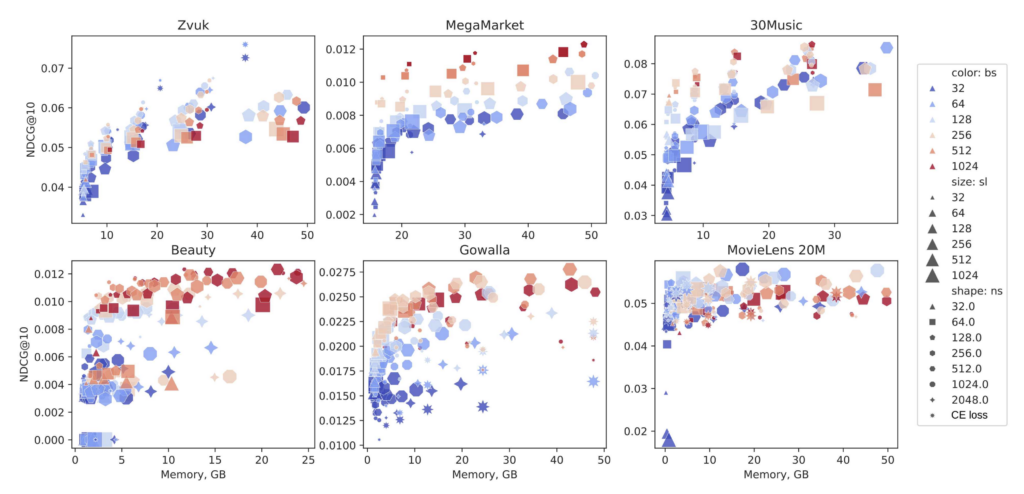
Memory scaling across three dimensions: batch size, sequence length, and number of negative samples across six datasets

The plot above visualizes roughly 1000 training runs of SASRec across different configurations of batch size (bs), sequence length (sl), and number of negative samples (ns). The takeaway is immediately visible: batch size is the dominant factor. Large batch sizes consistently cluster at the top of the quality chart, regardless of how many negatives were used. This holds across all datasets except Zvuk, where bigger ns is actually more important.

More Negatives Helps — Up to a Point

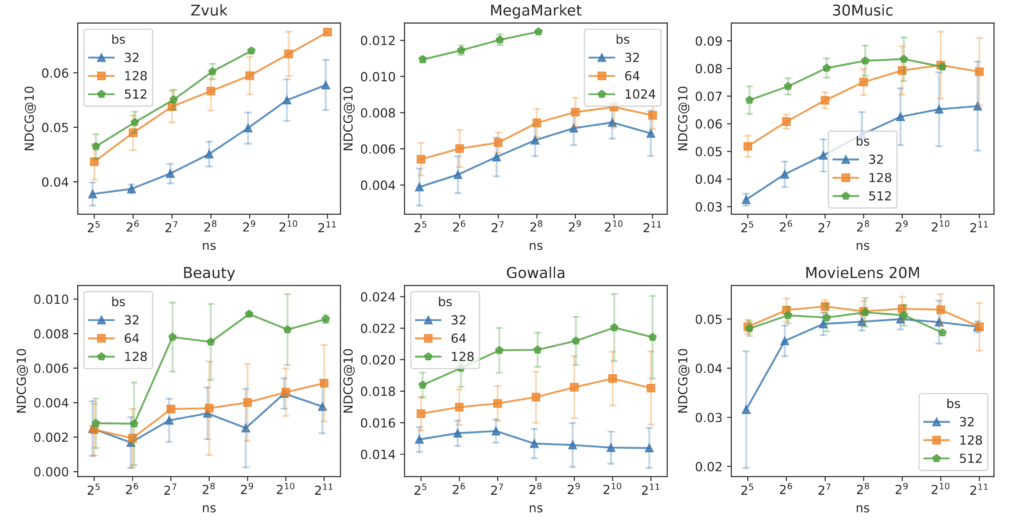
NDCG@10 vs. number of negative samples (ns), aggregated across sequence lengths, per dataset

Looking more closely at the relationship between ns and NDCG@10, performance increases with ns up to a certain threshold but then saturates or even slightly drops: MegaMarker, 30Music, Gowalla. For MovieLens, ns has surprisingly little influence at all.

It’s the Interactions That Matter Most

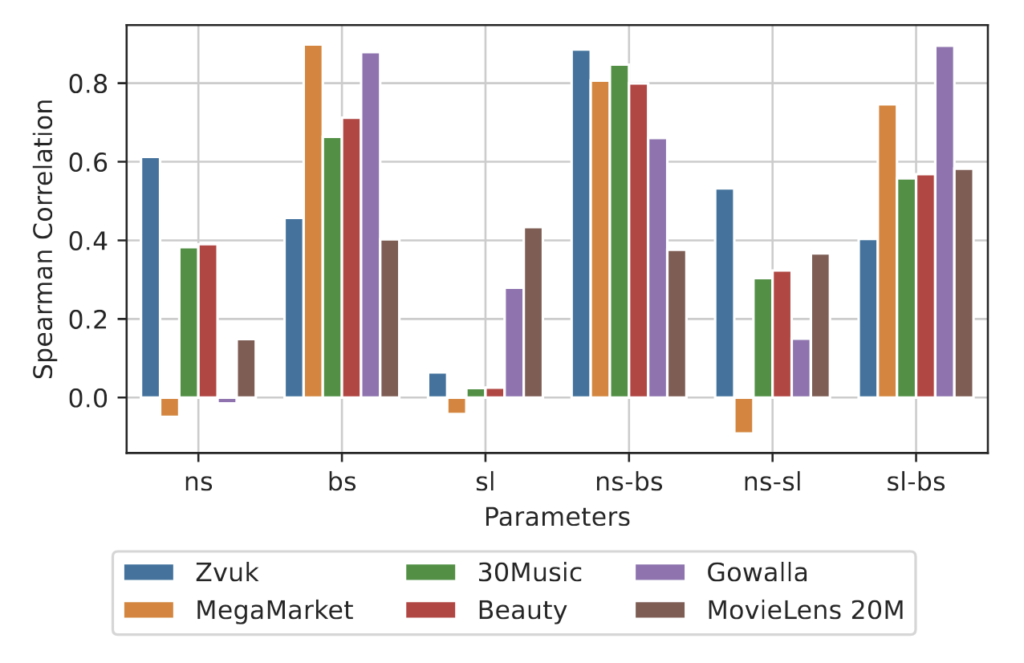
Spearman correlation for bs, sl, ns and their pairwise interactions

When we ran Spearman correlation analysis across all datasets, the picture became even clearer. Both bs and ns matter individually, but their interaction (bs×ns, sl×bs) matters even more. Scaling one dimension or while holding the others fixed gives diminishing returns, especially ns or bs have the least impact unless combined! The best configurations consistently came from balancing batch size and negative samples seem to be more important on average however, it all depends on dataset.

What This Means in Practice

  • Very small ns (e.g. 32) leads to unstable, weak training across all datasets.
  • Very large ns doesn’t always help and can hurt.
  • A moderate batch size of 256+ with a reasonable sequence length will often outperform a configuration with 2048 negatives and a tiny batch.
  • If you free up GPU memory, don’t pour it all into ns spread it across bs, ns simultaneously.

The full dataset of 997 training runs, covering every bs/sl/ns configuration we evaluated, is publicly available alongside the code at github.com/On-Point-RND/MemoryEfficientSRS.